How to Navigate the
Exhibitor Portal

THIS PAGE WILL GUIDE YOU THROUGH THE STEPS TO ACCESS THE EXHIBITOR PORTAL, ADD YOUR TEAM MEMBERS, AND SHARE THE INFORMATION AND CONTENT NEEDED TO INITIATE YOUR COMPANY’S PROMOTION ACROSS DUCO’S CHANNELS.

1. Accessing the Exhibitor Portal


How to Access the Exhibitor Portal

  • Locate the onboarding email sent by the DUCO Marketing Team and click Log In.

  • If this is your first time accessing the Exhibitor Portal, you will be prompted to create a password before proceeding.

  • After setting your password, you will be redirected to the Exhibitor Portal Overview page.

  • Alternatively, you may access the portal directly via the following link: DUCO Exhibitor Portal.

  • Once logged in, the Overview Page will serve as your starting point to navigate the portal and share the information required to begin your company’s promotion across DUCO’s channels.

NOTE:

If you represent multiple companies or properties at DUCO France 2025, simply choose which one you’d like to manage when you log in. Then complete your tasks and profile updates for each Exhibitor Portal access separately.

We recommend bookmarking the page for easy access throughout the preparation process.
2. Language Settings


The Portal may adopt the default language of your internet browser.

Kindly ensure the page is displayed in English to follow our instructions seamlessly. To switch to English, simply scroll to the bottom of the page and select “English” in the language menu.

3. Invite a Team Member


After the first log in, you can add a team member as an Admin to support you with tasks, content uploads, and updates within the Exhibitor Portal. Please note that you may add as many administrators as needed to assist with tasks and profile updates.

How it works:

  • Once logged in, go to the Portal Admins section in the right-hand menu.
  • Click on the Admins tab and then select Add Admin.
  • Enter the First Name, Last Name, and Email Address of your colleague.
  • They will receive an invitation to access the portal and collaborate on your company’s presence at DUCO.

NOTE:

Once an access has been created, if you need to remove a colleague’s access to the Exhibitor Portal, please contact the DUCO Marketing Team for assistance.

4. Complete your assigned tasks


Your assigned tasks will guide you through the content collection process. Please follow each step carefully:

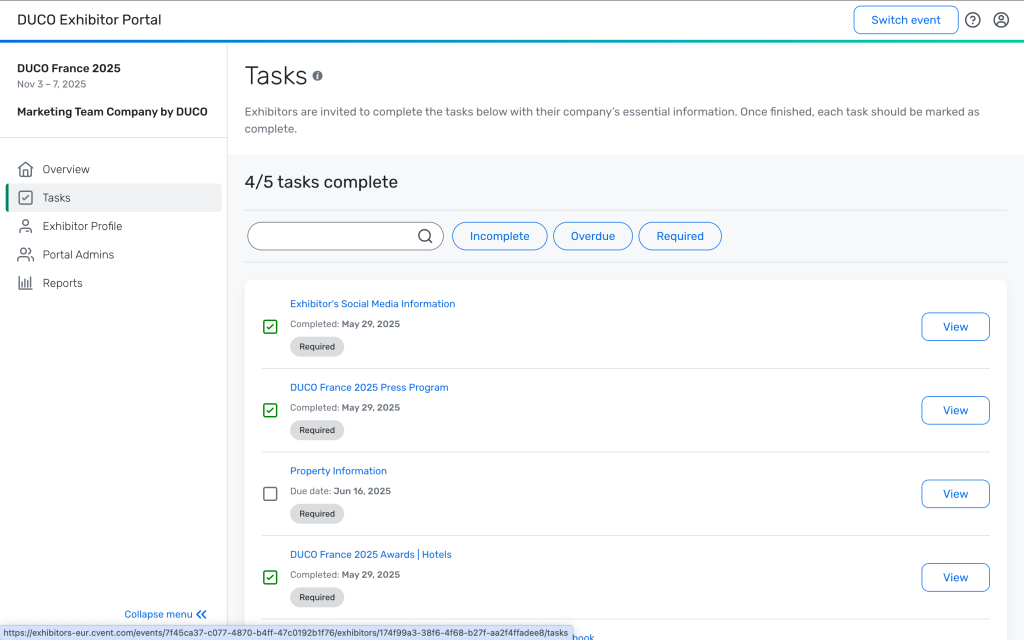
  • Go to Tasks in the left-hand menu.
  • Click View to open each task.
  • Read the instructions carefully and complete the required actions.
  • Upload any necessary files directly within each task. 
  • Once each tasks are completed, please click the checkboxes next to the task to mark them as complete. 
  • Review and update your Company information and content as needed.

5. Tasks


Review the Exhibitor Portal Journey & Marketing Guidebook
Kindly take a moment to carefully review the content and instructions in the DUCO Marketing Guidebook.

Each step has been thoughtfully designed to guide you through your onboarding experience with clarity and ease. Please ensure that each task is completed and marked accordingly to guarantee the continuity of your participation.

Please watch the video below for guidance on how to navigate and complete the checklist within the Exhibitor Portal.

6. Complete your Profile


Exhibitor Information

We invite you to review and complete the profile information with Company Name and website. Kindly note that you may update your company name until August 19th, 2025.

Images

In the Images section, you may replace the DUCO logo with your company’s logo. This logo will appear only on your Exhibitor profile in the DUCO App.

NOTE:

To update your company profile, click Edit in the top‑right corner of the screen. Once you’ve completed your changes, click Save in the same location.

NOTE:

Kindly note that the “Reports” sections are not relevant at this time and will not be displayed to Exhibitors. No action is required.

Should you have any questions, please don’t hesitate to reach out to us.

We appreciate your support and collaboration.


Merci et à Bientôt, 
 
DUCO Marketing Team
[email protected]